LUFS explained: what they measure and how loud your mix should be
LUFS (Loudness Units relative to Full Scale) measure perceived loudness, as defined by ITU-R BS.1770. There is no standard level for a mix before mastering: published guidelines range from -24 to -18 LUFS integrated, with peaks below 0 dBFS. Spotify then plays every track at -14 LUFS integrated. Below: each platform's level with its source, and how to meter LUFS in FL Studio.
What are LUFS?
LUFS are a unit of loudness defined by ITU-R BS.1770. A K-weighting filter cuts the low end and lifts the highs before the energy is measured, so the reading follows how loud a sound feels rather than how much signal it carries. 1 LU equals 1 dB, and LUFS and LKFS name the same measurement.
The EBU Tech 3341 spec defines three time windows:
- Momentary: the last 400 milliseconds.
- Short-term: the last 3 seconds.
- Integrated: everything played since the measurement started.
An absolute gate at -70 LUFS keeps silence out of the integrated reading. Streaming services normalize on the integrated value.
The current revision of the recommendation is ITU-R BS.1770-5 (November 2023). For stereo it changes nothing compared with BS.1770-4, which Fern implements: the 2023 revision only adds measurement of object-based (immersive) audio.
How loud should a mix be before mastering?
No standard sets the level of a mix before mastering. Published guidelines put a mix between -24 and -18 LUFS integrated, with no peak above 0 dBFS on the Master. If an engineer is mastering your track, their input level wins: ask them before you export.
These are the published guidelines, with their authors:
| Source | Guideline | Date |
|---|---|---|
| iZotope (Ian Stewart, "What are LUFS?") | -24 to -20 LUFS integrated; -20 to -18 LUFS short-term while mixing | February 8, 2023 |
| MasteringBOX ("LUFS Metering System") | about -18 LUFS; loudest peak below 0 dB, with 3 to 6 dB of headroom | July 28, 2017 |
| FL Studio manual (Image-Line, "Levels, Mixing & Clipping") | no peak above 0 dB on the Master; mix first, master second | read November 9, 2026 |
These numbers are working conventions for LUFS mastering prep. They leave the mastering stage room to compress and limit without starting from a file that already clips.
Streaming loudness levels, platform by platform
Spotify is the only major service that publishes its level on a help page. Other figures you'll see come from a forum post, third-party measurements, or pages that cite nothing. The table gives each number its status.
| Platform | Playback level | Peak guidance | Source | Status |
|---|---|---|---|---|
| Spotify | -14 LUFS integrated (Premium: Loud -11, Normal -14, Quiet -19) | -1 dBTP; -2 dBTP if the master is louder than -14 | "Loudness normalization" help page | published |
| Deezer | -15 LUFS | not stated | reply on the Deezer forum (December 2019), relaying the tech team; the "Volume Normalization" help page gives no value | stated, not documented |
| Apple Music | -16 LUFS, widely quoted | at least 1 dB of headroom | Apple Digital Masters guide (April 2021): describes Sound Check, gives no LUFS value | not published by Apple |
| YouTube | -14 LUFS | not stated | Production Advice measurements via "Stats for nerds" | not published by YouTube |
| TIDAL | -14 LUFS, album normalization | not stated | Meterplugs (2016); Eelco Grimm's study (AES, 2017) that led to album normalization | not published by TIDAL |
| Amazon Music | -14 LUFS | -2 dBTP, recommended by third parties | NUGEN Audio, Meterplugs (2019); Amazon's help page gives no value | not published by Amazon |
| AES TD1008 (2021), now the AES77-2023 standard | music: -14 for the loudest track of an album, about -16 on average; speech: -18 | not given here | Production Advice, Radio World | recommendation to distributors, not a platform rule |
Spotify normalizes a whole album with one gain value, so the gaps between its tracks stay the same. On shuffle or in a playlist, each track gets its own gain. These values were checked on November 9, 2026, and services can change them at any time.
Should you master to -14 LUFS?
You don't have to. Normalization turns down a track that is louder than the reference and, on Spotify, can turn up a quieter one. A master at -9 LUFS won't play louder than one at -14 on Spotify.
Mastering louder is still common. Image-Line's manual (Emphasis page) says music usually lands between -9 and -12 LUFS integrated. In that case, Spotify recommends keeping true peak below -2 dBTP. The final level is a call for whoever masters the track, based on the genre and where the file is going.
LUFS meters in FL Studio
FL Studio ships with three plugins that show LUFS, and not every edition includes all three (Image-Line manual and edition comparison page, read November 9, 2026):
| Plugin | What it shows | Editions |
|---|---|---|
| Wave Candy | "ITU-R BS.1770" meter mode; the manual doesn't say whether it shows integrated loudness | all |
| Emphasizer | integrated LUFS only | all, since FL Studio 2025.2 |
| Emphasis | momentary, short-term, integrated, and true peak | All Plugins Edition |
To take a reading in FL Studio:
- Put the meter in the last slot of the Master, after the limiter.
- Play the song from the start.
- Read the integrated value at the end.
- Reset the meter after every change: integrated loudness adds up everything played since the start.
Third-party LUFS meters, such as Youlean and NUGEN, are another option.
Track loudness: gaps, not targets
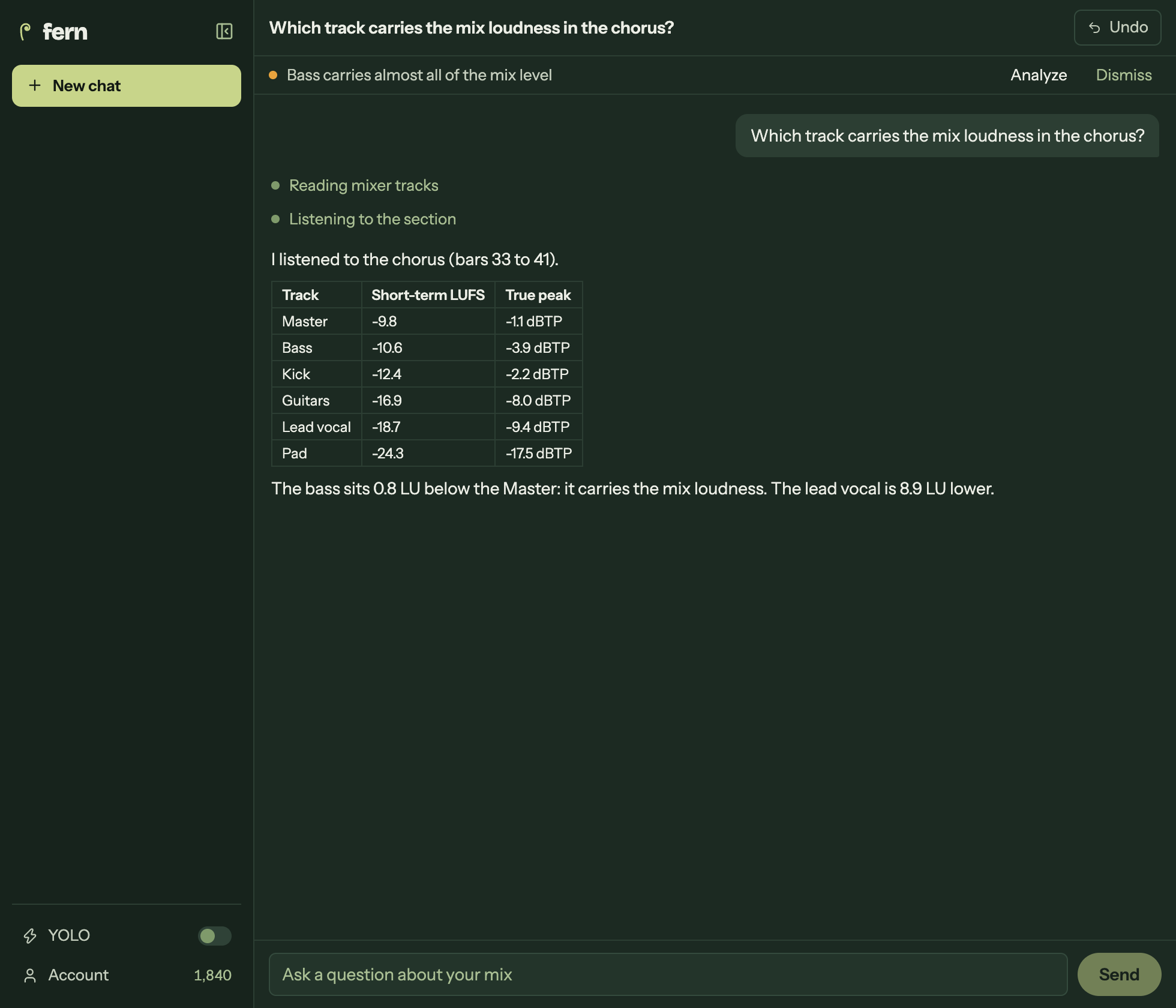
There is no LUFS target for a single track. What matters is the gap between tracks and how much each one contributes to the Master. iZotope's manual method is to solo each key element and read its short-term loudness. In FL Studio, that means moving one meter from track to track, or opening one per track.
Fern takes that measurement in one pass. One instance on the Master measures up to 125 Mixer tracks in momentary, short-term, and integrated LUFS (ITU-R BS.1770-4), with true peak oversampled four times. Fern also flags a track that sits within 1 LU of the Master on its own: that track is carrying the mix's loudness. You can see every track's loudness at once, or measure the LUFS of every track from the Master in your own project.
True peak and the -1 dBTP rule
True peak is the peak of the signal reconstructed between samples. It can go above 0 dBFS once the file is converted to analog or encoded to MP3 or AAC, even when no sample reaches 0 dBFS.
That's why Spotify asks for true peak below -1 dBTP, and below -2 dBTP for a master louder than -14 LUFS integrated. The meters on FL Studio's Mixer tracks read samples, so they don't show this peak. You need a true peak meter, such as Emphasis in the All Plugins Edition.
Set your levels before you mix
Loudness gaps between tracks start with their input levels. The gain staging guide shows how to set your levels before you mix in FL Studio, where the Mixer fader comes after the effects.
A mix at the right loudness can still be unbalanced: a vocal too low in the chorus, a kick and bass masking each other. Mastering works on the final stereo file and can't fix one track. Read what mastering can't fix, or browse more mixing guides for FL Studio.
FAQ
What LUFS does Spotify use?
Spotify plays tracks at -14 LUFS integrated by default, according to its "Loudness normalization" help page. Premium listeners can switch to Loud (-11) or Quiet (-19). Spotify recommends true peak below -1 dBTP, or below -2 dBTP for masters louder than -14.
What LUFS should I master to?
There is no required number. Spotify turns a louder master down to -14, so mastering louder doesn't make it louder there. Image-Line's manual puts most music between -9 and -12 LUFS integrated; at that level, keep true peak below -2 dBTP.