How to sidechain in FL Studio: kick, bass and 808
To sidechain in FL Studio, select the kick's Mixer track, right-click the send switch on the bass track and choose "Sidechain to this track". Then open Fruity Limiter on the bass, go to the COMP tab, pick the kick in SIDECHAIN, lower THRESH and raise RATIO until the bass dips as much as you want. The bass or 808 then drops on every kick hit.
How do you sidechain in FL Studio?
Sidechaining in FL Studio takes two moves: create a sidechain route from the kick to the bass in the Mixer, then tell the compressor on the bass to listen to that route. The compressor turns the bass down on every kick hit and leaves the kick itself untouched.
The menu names below are the ones in Image-Line's manual.
- Open the Mixer (F9) and click the kick's Mixer track to select it.
- On the bass track, right-click the send switch (the small arrow at the bottom of the track) and choose "Sidechain to this track". The manual notes that this creates a send with its level set to 0.
- Load Fruity Limiter into a slot on the bass track. Switch to the COMP tab, right-click SIDECHAIN and pick the kick's track.
- Lower THRESH below the bass peaks, raise RATIO, then set ATT, REL and CURVE.
- Loop a section where the kick and bass play together and listen.
On a Mac. Every step uses a right-click: a two-finger click on the trackpad, or the right button of a mouse. Ctrl+click also works as a right-click since FL Studio 26.1.1 (July 2026), which fixed a bug reported on the Image-Line forum (fix 22235 in the version history).
Fruity Limiter settings for bass
A Fruity Limiter sidechain is set like any compressor; only the detection source changes. Two published figures make a good starting point:
- Mix Elite (guide updated November 1, 2026) suggests a ratio around 4:1 and 7 to 10 dB of gain reduction on the bass.
- Native Instruments gives about 6 dB of reduction per kick hit.
Keep the attack (ATT) short so the bass drops as the kick starts. The release (REL) decides when the bass comes back, and it has to be back before the next hit. At 140 BPM, a kick on every beat lands every 429 ms (60 ÷ 140). A release longer than that gap keeps the bass down all the time. Set it by ear, starting short.
The manual warns that a release that is too short can distort. The makeup GAIN brings back the level you lost if the bass sounds too quiet once the sidechain is in place.
Two routing mistakes that mute the kick or break the sidechain
Image-Line's manual describes three routing behaviors that explain most "my sidechain doesn't work" posts.
- The "… only" commands mute the kick. In the track menu, "Sidechain selected to this track only" and "Sidechain this track to selected only" create the route and also switch off the source track's send to the Master. The kick drops out of the mix. Use "Sidechain to this track" without "only", or turn the kick's Master send back on.
- The SIDECHAIN list is empty. Fruity Limiter and Fruity Compressor only list a source once a sidechain route exists in the Mixer. The one exception is the Master track, where every track is listed.
One more point catches people out: you don't hear a sidechain route on the destination track. The kick signal there only feeds plugins with a sidechain input. You still hear the kick through its own send to the Master.
The Fruity Peak Controller method
Fruity Peak Controller follows the kick's envelope and uses it to drive a parameter, here the bass volume.
- Load Fruity Peak Controller on the kick's Mixer track.
- Right-click the bass track's fader, choose "Link to controller", then the internal source "Peak ctrl - Peak".
- In Peak Controller, turn BASE up, then set VOL to a negative value. The manual calls this a "ducking" effect: the output dips on each kick peak.
- Set DECAY (time to fall back to BASE) and TENSION (the curve shape, mostly useful on the decay).
Peak Controller's Mute button silences audio at the plugin's output, which means the kick on that track, and the manual lists it as on by default. Turn it off if the kick must stay audible through that track, or put Peak Controller on a muted copy of the kick.
Fruity Limiter or Peak Controller?
Fruity Limiter reacts to the kick's level through a threshold and a ratio. Peak Controller copies the kick's envelope onto any parameter, with no threshold.
| Fruity Limiter (COMP) | Fruity Peak Controller | |
|---|---|---|
| Reacts to | the kick's RMS level above the threshold | every kick peak |
| Controls | THRESH, RATIO, ATT, REL, CURVE | BASE, VOL, DECAY, TENSION |
| What it moves | gain on the track it sits on | any linked parameter (fader, EQ band, send) |
| Best for | a measured dip on the bass | a fixed dip, or ducking a single frequency band |
Kick and 808: tune before you compress
A big part of how to mix 808 against a kick is pitch. An 808 is a tuned bass. If its fundamental lands in the same band as the kick's, sidechain eases the clash without solving it: the two notes still overlap between hits.
Fundamentals of low notes, in equal temperament with A4 = 440 Hz (ISO 16):
| Note | Fundamental |
|---|---|
| C1 | 32.7 Hz |
| E1 | 41.2 Hz |
| F1 | 43.7 Hz |
| G1 | 49.0 Hz |
| A1 | 55.0 Hz |
| C2 | 65.4 Hz |
This table uses scientific pitch notation (middle C = C4). In the Piano roll, FL Studio labels middle C as C5, one octave higher. The manual doesn't specify the naming in Parametric EQ 2's Key menu: go by the frequency shown rather than the note name.
In Fruity Parametric EQ 2, right-click a band and choose "Key" to center it on a note's fundamental. You can carve the 808 exactly at the kick's note, or the other way around.
To duck only the low end of the 808, link the kick's Peak Controller to the gain of a Parametric EQ 2 band on the 808 rather than to its fader. Mix Elite describes this with a split around 200 Hz: the top of the 808 stays steady and only its low end makes room for the kick and 808 to share the bottom.
How do you stop the kick and bass from clashing?
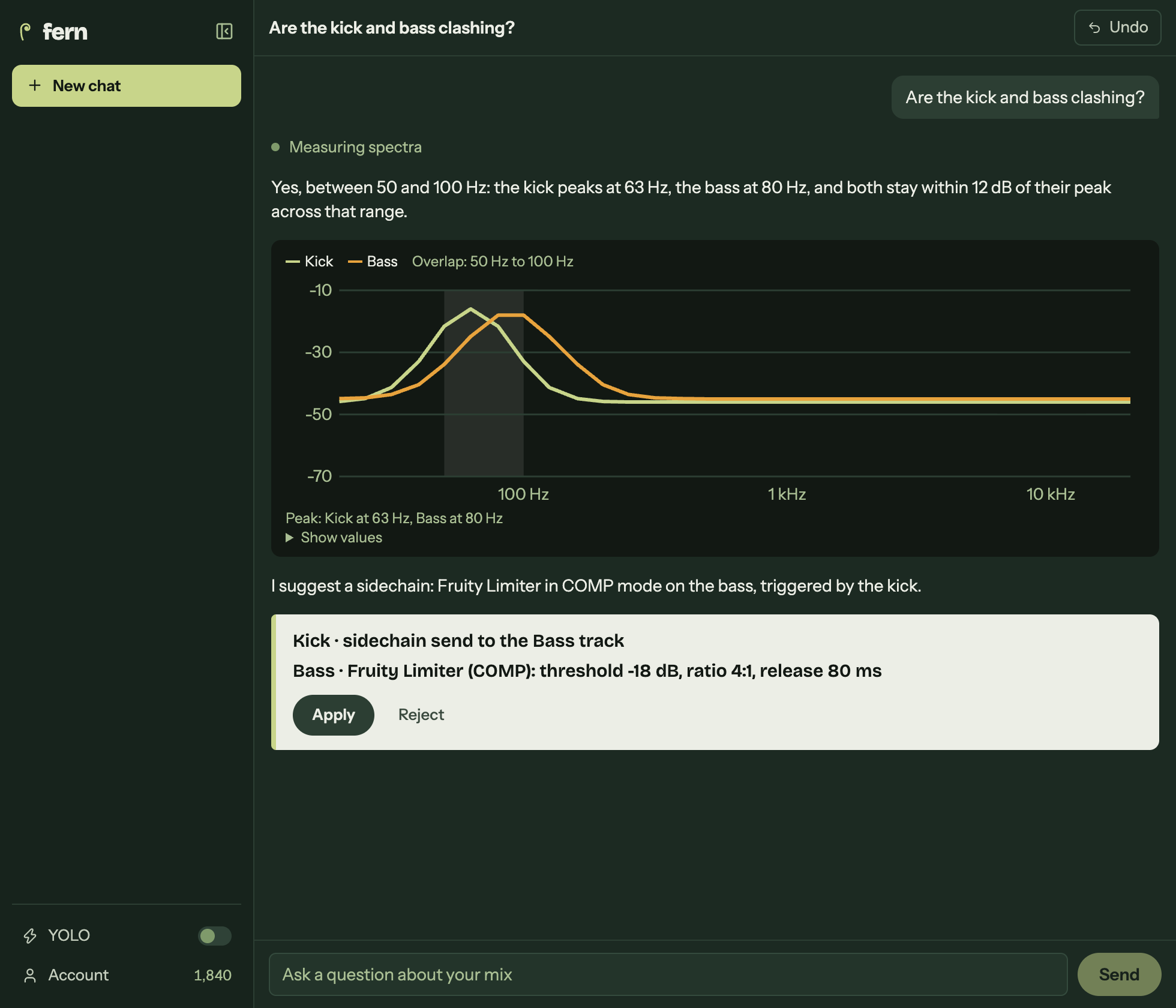
Play the section, overlay the averaged spectra of the kick and bass, and find the bands where both tracks sit close to their own peak. That's where one covers the other, which is called frequency masking. Then fix it with sidechain, EQ or arrangement. A snapshot spectrum shows one note only, so average over several.
In FL Studio, the manual way takes two analyzers:
- Put a Fruity Parametric EQ 2 (no cuts) or a Fruity Spectroman last in the chain on the kick track, then on the bass track.
- Loop a section of several bars where both play.
- Open both windows side by side and note where each track is loudest.
- The masking sits where those ranges overlap.
It stays approximate, because the two windows share neither a scale nor the moment of measurement.
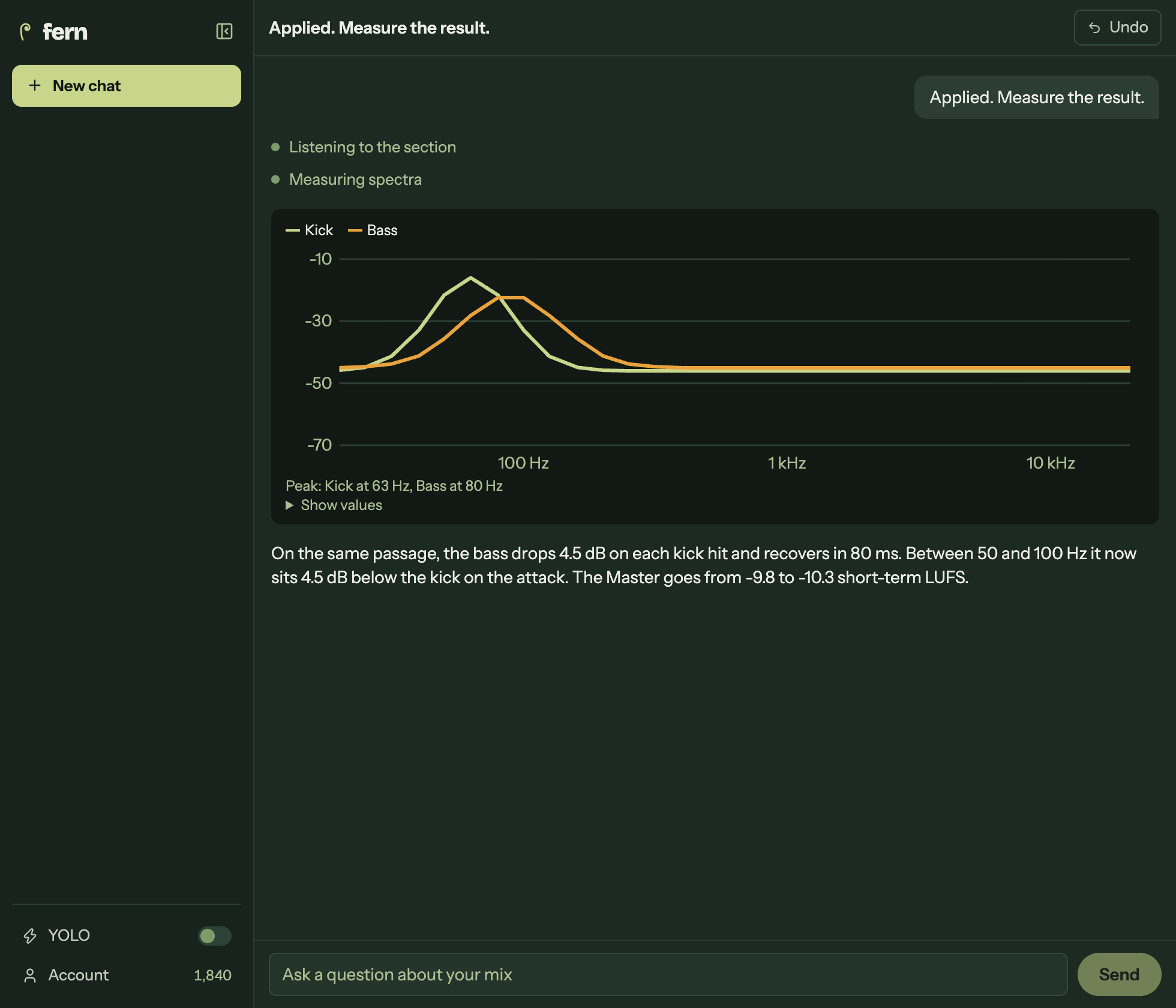
Fern does this comparison from a single instance on the Master, across up to 125 Mixer tracks. It overlays two tracks' spectra in 31 third-octave bands, from 20 Hz to 20 kHz, averaged over six reads in 1.5 seconds. It returns the longest range where both tracks are within 12 dB of their own peak, which is the masking rule above, in numbers. To spot kick and bass masking, ask it while the song plays. It also logs each track's loudness bar by bar, which shows whether the bass really dips under the kick. It's an assistant that measures your kick and bass as the song plays, then suggests settings you audition before you apply them.
Without sidechain: EQ and arrangement
Sidechain isn't the only fix for kick and bass.
Split the low end with EQ: cut the bass in a narrow band at the kick's fundamental, or cut the kick where the bass has its own. Parametric EQ 2's Key menu puts the band on the right note.
Shorten or shift: a shorter 808 note clears space before the next kick. Moving the kick or the bass note a few steps in the Piano roll keeps them from starting together.
Pick a tuned kick: a kick whose fundamental sits on the song's root, or far from the 808's note, reduces the overlap before any processing.
The same trick on a vocal
The same route lets you duck the reverb, or the synths, while the vocal sings. The vocal track becomes the sidechain source and the reverb or instrument track the destination. Mix Elite suggests about 2 dB of reduction on the instruments under the vocal, so the vocal comes forward and the rest gets its space back between phrases. The vocal guide shows how to duck the reverb under the vocal.
More FL Studio mixing guides are collected in the guides hub.
FAQ
Why is my sidechain not working?
Check four things. The sidechain route exists in the Mixer, otherwise the SIDECHAIN list is empty. The kick is selected as the source in the plugin. THRESH sits below the kick's level. And the kick's Master send is still on, since the "… only" commands switch it off.
Why does my sidechain click on every kick?
The bass gain changes too fast. Lengthen the attack and release a little, or raise CURVE in Fruity Limiter for a slower response. The manual warns that a release that is too short can distort. With Peak Controller, raise DECAY.